

The five building blocks of a great prompt Watch
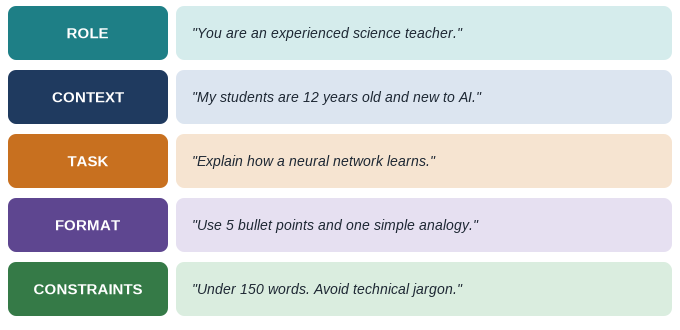
You do not need all five every time, but the more of them you include, the better and more predictable the answer.
Weak prompt versus strong prompt Watch
Proven prompting techniques Watch
| Technique | How to do it | Example |
|---|---|---|
| Be specific | State exactly what you want | "Summarise in 5 bullets for a 10-year-old" |
| Give context | Explain who, why and background | "This email is to an angry customer" |
| Assign a role | Tell it who to act as | "Act as an experienced math tutor" |
| Show examples (few-shot) | Give one to three samples of the output you want | "Here are two product descriptions I like..." |
| Ask for steps | Request step-by-step reasoning | "Work through this step by step" |
| Set the format | Table, list, JSON, email, code | "Answer as a table with 3 columns" |
| Add constraints | Length, tone, words to avoid | "Under 100 words, formal tone" |
| Iterate | Refine with follow-up messages | "Make it shorter and more persuasive" |
| Let AI ask | Ask it to question you first | "Ask me 5 questions before you start" |
Improve answers in a quick loop Watch
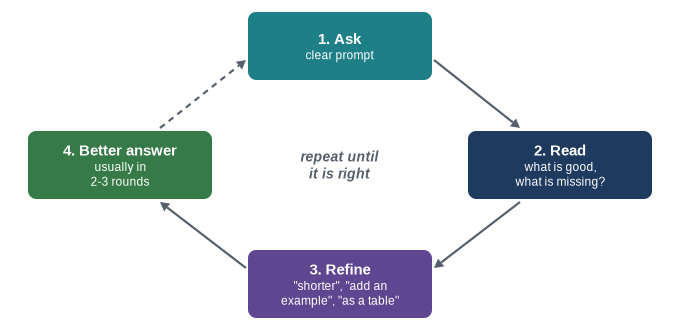
Do not expect a perfect answer first time. Read what you got, say what to change - shorter, simpler, add an example, use a table - and ask again. This loop is how experienced users get excellent results.
Ready-to-use prompt templates Watch
STUDY:   Explain [topic] as if I am a beginner. Use an analogy,
         then give me 5 quiz questions with answers.

WRITING: Rewrite this [text] to be clearer and more [tone].
         Keep my meaning. Show the main changes.

PLANNING: Create a [7-day] plan to [goal]. I have [time]
         per day. Present it as a table.

CODING:  Write a [language] function that [does X].
         Add comments and 3 test cases.

RESEARCH: Give me the key arguments for and against [topic].
         Mark anything I should verify.
What you can use AI for every day Watch
- Learning - explanations at your level, practice questions, flashcards, language practice.
- Writing - drafts, emails, summaries, proofreading, translation.
- Work - meeting notes, reports, spreadsheet formulas, presentation outlines.
- Coding - writing, explaining and fixing code; learning new languages.
- Creativity - brainstorming names, stories, designs and marketing ideas.
- Life admin - trip planning, budgeting, recipes from what is in your fridge.
Do's and don'ts Watch
| Do | Don't |
|---|---|
| Verify facts, numbers and citations | Trust every answer blindly |
| Give context and examples | Expect it to read your mind |
| Iterate and refine | Give up after one weak answer |
| Remove personal and confidential data | Paste passwords, ID numbers or private client data |
| Use AI to learn and improve your own work | Submit AI work as your own where that is not allowed |
| Disclose AI use where required | Hide AI use from employers, teachers or publishers who require disclosure |
Chapter summary
- Good prompts include role, context, task, format and constraints.
- Techniques such as examples, step-by-step reasoning and iteration greatly improve results.
- AI helps with learning, writing, work, coding, creativity and daily planning.
- Always verify important facts and protect private information.